只草拟 · 你亲自点发送,绝不自动回复

跨海聊 CrossChat

在你自己的客服后台,用 AI 分级草拟多语种买家回复:翻译、知识库引用、合规与 PII 护栏。数据默认只在本机。

从 Chrome Web Store 安装 安装教程(含 Edge 与国内离线安装)
免费(上线验证期)· Chrome / Edge 110+ · 无需注册 · 支持 BYOK 与离线演示 · 打不开商店?离线装

为跨境客服设计

不替你说话,只让你回复得更快、更稳。

智能分级,省钱省时

常规 FAQ 走本地即时缓存,日常问题用快速模型,只有纠纷、强烈负面等难单才调用旗舰模型。

知识库引用

草稿标注引用了哪一条售后 KB(物流、退换货、尺码、支付),发送前逐条可核对。

多语翻译与草拟

买家消息自动翻译,按买家语言草拟回复,覆盖跨境会话场景。

PII 入模前脱敏

邮箱、电话、银行卡号、地址在发送给模型前自动脱敏,采纳草稿时在本机还原。

合规护栏

站外支付、交换联系方式、好评利诱、违规承诺等风险草稿会被标红甚至禁止填入。

本地用量看板

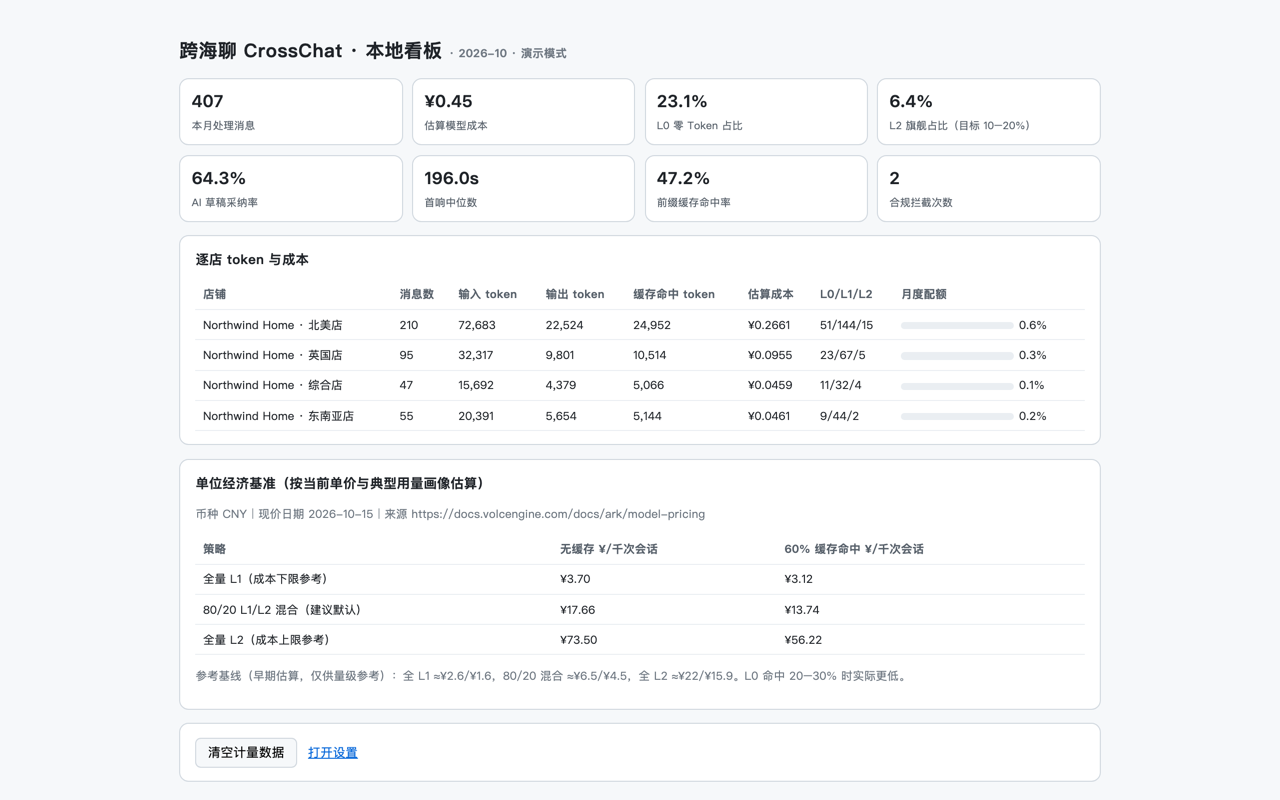
处理量、估算模型成本、L0/L1/L2 占比、采纳率、首响中位数——全部本机计算。

按需授权,不授权不注入

不申请「读取所有网站数据」。你添加哪个站点才注入哪个,随时可撤。

BYOK:Key 不出本机

填入你自己的火山方舟 Key,请求浏览器直发服务商,不经过我们的服务器;也可只用离线演示。

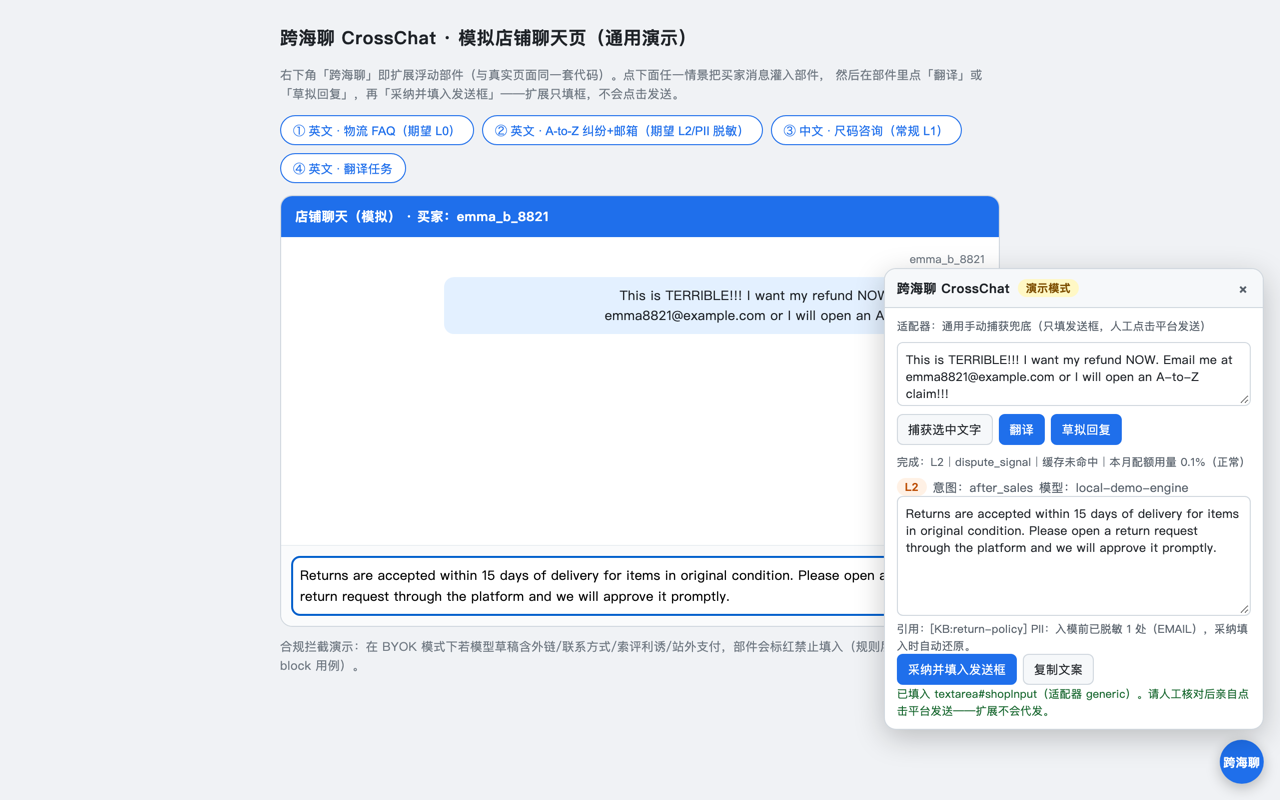
实际界面(真实产品渲染)

演示数据,无真实买家信息。
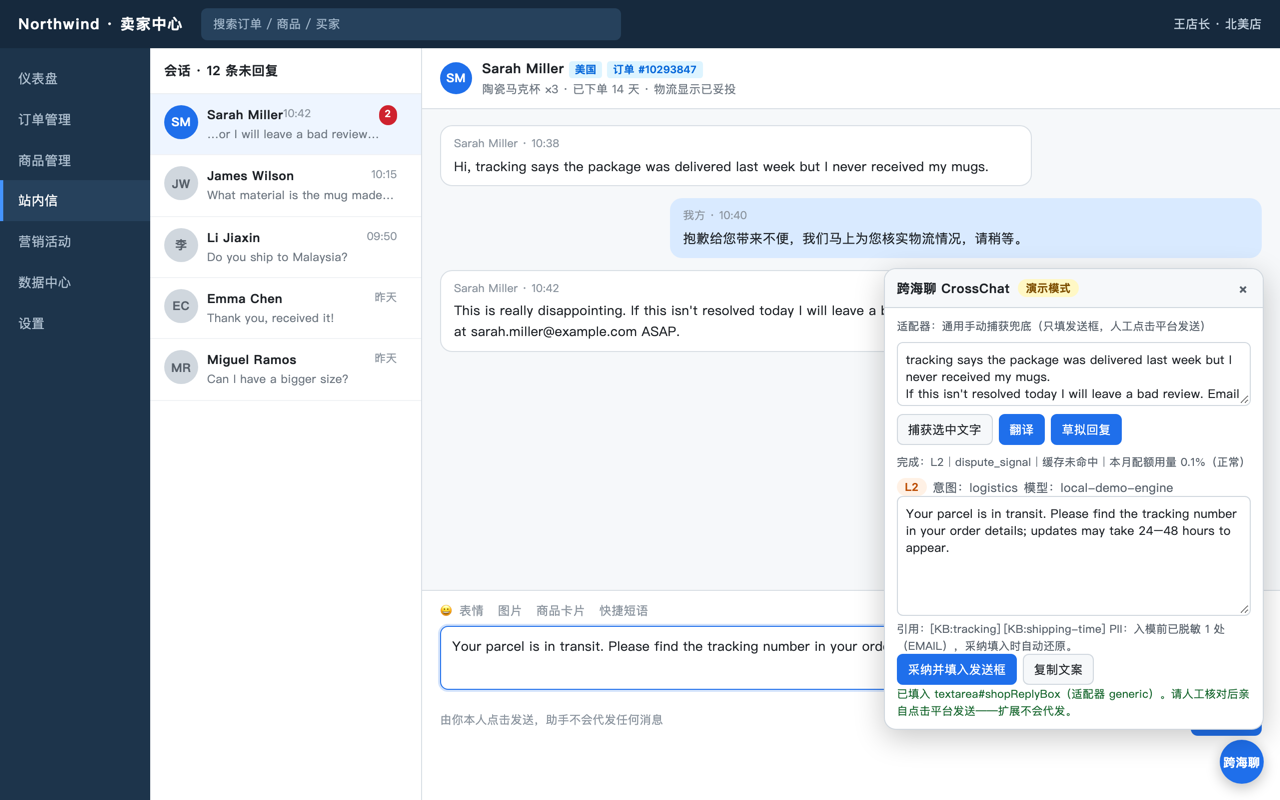
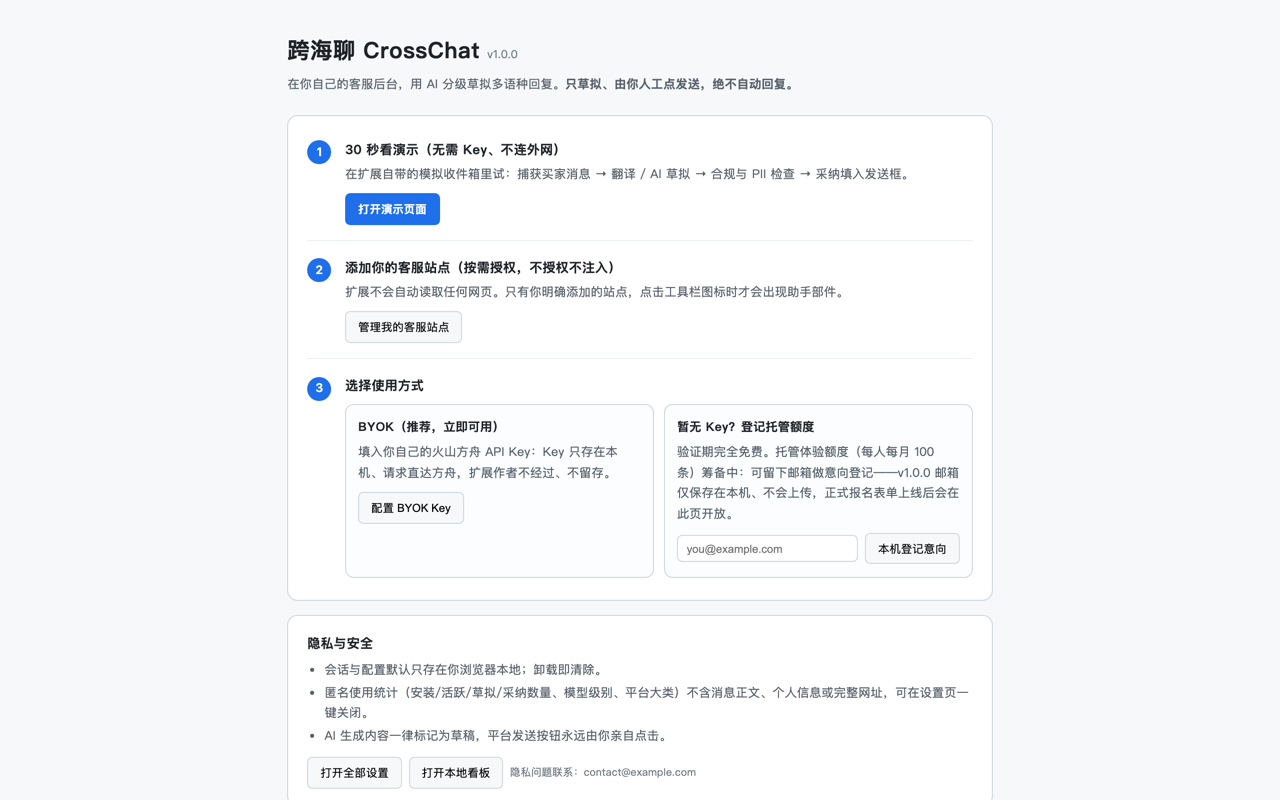
卖家收件箱中草拟差评纠纷回复:L2 升级、PII 脱敏、人工发送 离线演示页:纠纷+邮箱场景的完整处理流程 本地用量与成本看板 首次引导:演示、站点授权、BYOK 与隐私说明

三步开始

  1. 安装并看 30 秒演示——内置模拟收件箱,无需 Key、不连外网,先确认它怎么工作。
  2. 添加并授权你的客服站点——按需逐个授权;需要真实草拟时,可选填入你自己的火山方舟 API Key。
  3. 选中买家消息 → 翻译 / 草拟 → 审核修改 → 你亲自点平台的发送按钮。
硬边界:扩展不会点击任何平台的发送按钮、不会定时发消息、不会执行账号操作。AI 生成内容一律标记为草稿。
中国大陆使用:访问不了商店时可下载安装包离线安装(开发者模式加载,无需商店账号);安装后的日常使用直连火山方舟国内端点,离线演示完全本地运行。配置火山方舟 Key 的图文步骤见安装教程。

常见问题速览

收费吗?

验证期完全免费;BYOK 的模型费用由你直接与火山引擎结算。

没有 API Key 能用吗?

可以,内置离线演示包含 4 个场景,跑通完整流程且不联网。

收集我的消息内容吗?

不。BYOK 内容从浏览器直发模型服务商;v1.0.1 起匿名统计通道已完全停用,扩展不发出任何统计请求、包内也不再含统计密钥。详见隐私政策。

支持哪些站点?

你授权的卖家后台、客服 CRM 和网页邮箱,支持自定义域名;默认零站点访问。

查看全部 11 个 FAQ →

Drafts only — you always click send; it never auto-replies

CrossChat

AI-tiered multilingual drafting for seller chats, right inside your own customer-service pages: translation, knowledge-base citations, compliance and PII guardrails. Your data stays local by default.

Install from the Chrome Web Store Install guide (Edge & offline install)
Free during launch validation · Chrome / Edge 110+ · No sign-up · BYOK or offline demo · Store blocked? Install offline

Built for cross-border support

It doesn't talk for you — it helps you reply faster and more safely.

Smart triage

Routine FAQs are served from an instant local cache, everyday questions use a fast model, and a stronger model is reserved for disputes and strongly negative messages.

Knowledge-base citations

Drafts cite the exact after-sales KB entry used (shipping, returns, sizing, payment), so every claim is verifiable before you send.

Translation & bilingual drafts

Buyer messages are translated and replies are drafted in the buyer's language.

PII masked before the model

Emails, phone numbers, card numbers and addresses are masked before any model call and restored locally when you adopt a draft.

Compliance guardrails

Risky drafts — off-platform payment, exchanged contacts, review incentives, policy-violating promises — are flagged or blocked from the reply box.

Local usage dashboard

Volume, estimated cost, L0/L1/L2 mix, adoption rate and median first response — all computed on your device.

Per-site authorization

No "read all websites" permission. The assistant is injected only on sites you add and grant; revocable at any time.

BYOK: key never leaves your device

Bring your own Volcengine Ark key; requests go browser-to-provider through no server of ours. Or just use the offline demo.

Real interface (authentic renders)

Demo data — no real buyer information.

Drafting a dispute reply in a seller inbox: L2 escalation, PII masking, human sends Offline demo page: full pipeline for a dispute-with-email scenario Local usage and cost dashboard Onboarding: demo, per-site grants, BYOK and privacy notes

Start in three steps

  1. Install and take the 30-second demo — a built-in simulated inbox, no key and no network, shows exactly how it works.
  2. Add and authorize your customer-service sites — grant per domain; optionally add your own Volcengine Ark API key when you want real drafts.
  3. Select a buyer message → Translate / Draft → review and edit → click the platform's send button yourself.
Hard boundary: the extension never clicks a platform send button, never schedules messages, and takes no account actions. Every AI output is marked as a draft.
Mainland China: if the store is unreachable you can download the package and load it offline in developer mode (no store account needed); day-to-day use goes directly to Volcengine's domestic endpoint, and the demo runs fully locally. The illustrated Ark key setup is in the install guide.

Quick FAQ

What does it cost?

Free during validation; BYOK model charges are settled directly between you and Volcengine.

Can I use it without an API key?

Yes — the built-in offline demo covers four scenarios and runs the full pipeline with no network.

Do you collect message content?

No. BYOK content goes browser-to-provider directly; since v1.0.1 the statistics channel is fully disabled — the extension sends no analytics requests and ships with no analytics secret. See the Privacy Policy.

Which sites are supported?

Seller backends, support CRMs and webmail you authorize, including custom domains — zero site access by default.

All 11 FAQ entries →